1. Overview(ସଂକ୍ଷିପ୍ତ ବିବରଣୀ)
1a. Purpose (ଉଦ୍ଦେଶ୍ୟ)
The Interactive Flat Panel is a medium that allows for better student interaction by delivering interactive content.
ଇଣ୍ଟରାକ୍ଟିଭ୍ ଫ୍ଲାଟ୍ ପ୍ୟାନେଲ୍ ହେଉଛି ଏକ ମାଧ୍ୟମ ଯାହା ଇଣ୍ଟରାକ୍ଟିଭ୍ ବିଷୟବସ୍ତୁ ପ୍ରଦାନ କରି ଉତ୍ତମ ଛାତ୍ର ପାରସ୍ପରିକ କ୍ରିୟା ପାଇଁ ଅନୁମତି ଦିଏ।
This comprises a large touchscreen display along with the presence of an Android motherboard and an OPS (Open Pluggable Specification) that allows for better interaction and management.
ଏଥିରେ ଏକ ବଡ଼ ଟଚସ୍କ୍ରିନ୍ ଡିସପ୍ଲେ ସହିତ ଏକ ଆଣ୍ଡ୍ରଏଡ୍ ମଦରବୋର୍ଡ ଏବଂ ଏକ OPS (ଓପନ୍ ପ୍ଲଗେବଲ୍ ସ୍ପେସିଫିକେସନ୍) ରହିଛି ଯାହା ଉତ୍ତମ ପାରସ୍ପରିକ କ୍ରିୟା ଏବଂ ପରିଚାଳନା ପାଇଁ ଅନୁମତି ଦିଏ।
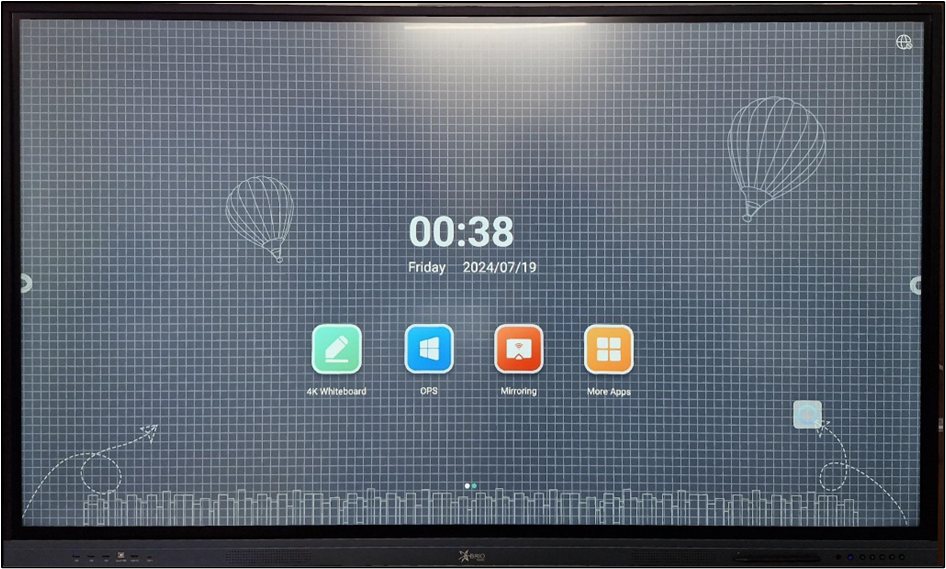
The Interactive Flat Panel (IFP) Display is designed to enhance classroom engagement and interactivity. It combines the functionality of a traditional whiteboard with the power of a computer, allowing teachers to deliver dynamic lessons and interact with digital content in real-time.
ଇଣ୍ଟରାକ୍ଟିଭ୍ ଫ୍ଲାଟ୍ ପ୍ୟାନେଲ୍ (IFP) ଡିସପ୍ଲେ ଶ୍ରେଣୀଗୃହର ସକ୍ରିୟତା ଏବଂ ପାରସ୍ପରିକ କାର୍ଯ୍ୟକଳାପକୁ ବୃଦ୍ଧି କରିବା ପାଇଁ ଡିଜାଇନ୍ କରାଯାଇଛି। ଏହା ଏକ ପାରମ୍ପରିକ ହ୍ୱାଇଟ୍ବୋର୍ଡର କାର୍ଯ୍ୟକାରିତାକୁ କମ୍ପ୍ୟୁଟରର ଶକ୍ତି ସହିତ ମିଶ୍ରଣ କରିଥାଏ, ଯାହା ଶିକ୍ଷକମାନଙ୍କୁ ଗତିଶୀଳ ପାଠ ପ୍ରଦାନ କରିବାକୁ ଏବଂ ବାସ୍ତବ ସମୟରେ ଡିଜିଟାଲ୍ ବିଷୟବସ୍ତୁ ସହିତ ପାରସ୍ପରିକ କ୍ରିୟା କରିବାକୁ ଅନୁମତି ଦିଏ।
1b. Functionality(କାର୍ଯ୍ୟକାରିତା)
Touchscreen Interaction(ଟଚ୍ ସ୍କ୍ରିନ୍ ପାରସ୍ପରିକ କ୍ରିୟା):
Multi-Touch Capability: Allows multiple users to interact with the screen simultaneously, supporting collaborative activities and group work.
ମଲ୍ଟି-ଟଚ୍ କ୍ଷମତା: ଏକାଧିକ ଉପଭୋକ୍ତାଙ୍କୁ ଏକକାଳୀନ ସ୍କ୍ରିନ୍ ସହିତ ଇଣ୍ଟରାକ୍ଟ କରିବାକୁ ଅନୁମତି ଦିଏ, ସହଯୋଗୀ କାର୍ଯ୍ୟକଳାପ ଏବଂ ଗୋଷ୍ଠୀ କାର୍ଯ୍ୟକୁ ସମର୍ଥନ କରେ।
Touch Gestures: Supports common touch gestures such as tap, swipe, pinch, and zoom, providing intuitive navigation and control.
ସ୍ପର୍ଶ ଅଙ୍ଗଭଙ୍ଗୀ: ଟ୍ୟାପ୍, ସ୍ୱାଇପ୍, ପିଞ୍ଚ୍ ଏବଂ ଜୁମ୍ ଭଳି ସାଧାରଣ ସ୍ପର୍ଶ ଜେଶ୍ଚରକୁ ସମର୍ଥନ କରେ, ଯାହା ସହଜ ନାଭିଗେସନ୍ ଏବଂ ନିୟନ୍ତ୍ରଣ ପ୍ରଦାନ କରେ।
Annotation and Drawing(ଟିପ୍ପଣୀ ଏବଂ ଚିତ୍ରାଙ୍କନ):
On-Screen Annotation: Teachers can write, draw, and highlight directly on the screen using a stylus or their fingers, making it easy to emphasize key points and illustrate concepts.
ଅନ୍-ସ୍କ୍ରିନ୍ ଟିପ୍ପଣୀ: ଶିକ୍ଷକମାନେ ଏକ ଷ୍ଟାଇଲସ୍ କିମ୍ବା ସେମାନଙ୍କ ଆଙ୍ଗୁଠି ବ୍ୟବହାର କରି ପରଦାରେ ସିଧାସଳଖ ଲେଖିପାରିବେ, ଅଙ୍କନ କରିପାରିବେ ଏବଂ ହାଇଲାଇଟ୍ କରିପାରିବେ, ଯାହା ମୁଖ୍ୟ ପଏଣ୍ଟଗୁଡିକ ଉପରେ ଗୁରୁତ୍ୱ ଦେବା ଏବଂ ଧାରଣାକୁ ବର୍ଣ୍ଣନା କରିବା ସହଜ କରିଥାଏ |
Digital Whiteboard: The IFP can function as a digital whiteboard, offering various tools such as pens, erasers, and shapes to facilitate lesson planning and delivery
ଡିଜିଟାଲ୍ ହ୍ୱାଇଟ୍ବୋର୍ଡ: IFP ଏକ ଡିଜିଟାଲ୍ ହ୍ୱାଇଟ୍ବୋର୍ଡ ଭାବରେ କାର୍ଯ୍ୟ କରିପାରିବ, ପାଠ ଯୋଜନା ଏବଂ ବିତରଣକୁ ସହଜ କରିବା ପାଇଁ କଲମ, ଇରେଜର ଏବଂ ଆକୃତି ଭଳି ବିଭିନ୍ନ ଉପକରଣ ପ୍ରଦାନ କରେ।
Content Sharing and Presentation(ବିଷୟବସ୍ତୁ ଅଂଶୀଦାର ଏବଂ ଉପସ୍ଥାପନା):
Screen Mirroring: Allows teachers to mirror their laptop or mobile device screen onto the IFP display, making it easy to share presentations, videos, and other content.
ସ୍କ୍ରିନ୍ ଦର୍ପଣ: ଶିକ୍ଷକମାନଙ୍କୁ ସେମାନଙ୍କର ଲାପଟପ୍ କିମ୍ବା ମୋବାଇଲ୍ ଡିଭାଇସ୍ ସ୍କ୍ରିନକୁ IFP ପ୍ରଦର୍ଶନରେ ଦର୍ପଣ କରିବାକୁ ଅନୁମତି ଦିଏ, ଯାହା ଉପସ୍ଥାପନା, ଭିଡିଓ ଏବଂ ଅନ୍ୟାନ୍ୟ ବିଷୟବସ୍ତୁ ଅଂଶୀଦାର କରିବା ସହଜ କରିଥାଏ |
File Management: Teachers can open, edit, and save documents directly on the IFP, eliminating the need for a separate computer.
ଫାଇଲ ପରିଚାଳନା: ଶିକ୍ଷକମାନେ ଏକ ପୃଥକ କମ୍ପ୍ୟୁଟରର ଆବଶ୍ୟକତାକୁ ଦୂର କରି ସିଧାସଳଖ IFP ରେ ଡକ୍ୟୁମେଣ୍ଟ ଖୋଲିପାରିବେ, ସଂପାଦନ କରିପାରିବେ ଏବଂ ସଂରକ୍ଷଣ କରିପାରିବେ |
Video Conference: It can also be used for classroom activities such as online classes, video conferencing, and recording lectures via webcam.
ଏହା ଶ୍ରେଣୀଗୃହ କାର୍ଯ୍ୟକଳାପ ଯେପରିକି online classes, video conferencing ଏବଂ webcam ମାଧ୍ୟମରେ ସଂରକ୍ଷଣ ବକ୍ତୃତା ପାଇଁ ମଧ୍ୟ ବ୍ୟବହାର କରାଯାଇପାରିବ |
Interactive Software and Apps: (ଇଣ୍ଟରାକ୍ଟିଭ୍ ସଫ୍ଟୱେର୍ ଏବଂ ଆପଗୁଡ଼ିକ)
Educational Software: The IFP comes preloaded with educational software and apps designed to support various subjects and teaching methods.
ଶିକ୍ଷାଗତ ସଫ୍ଟୱେର୍: IFP ବିଭିନ୍ନ ବିଷୟ ଏବଂ ଶିକ୍ଷାଦାନ ପ୍ରଣାଳୀକୁ ସମର୍ଥନ କରିବା ପାଇଁ ଡିଜାଇନ୍ ହୋଇଥିବା ଶିକ୍ଷାଗତ ସଫ୍ଟୱେର୍ ଏବଂ ଆପ୍ ସହିତ ପ୍ରିଲୋଡ୍ ହୋଇଛି |
App Store Access: Teachers can download additional apps from an app store to customize their IFP according to their needs and preferences.
ଆପ୍ ଷ୍ଟୋର ଆକ୍ସେସ୍: ଶିକ୍ଷକମାନେ ସେମାନଙ୍କର ଆବଶ୍ୟକତା ଏବଂ ପସନ୍ଦ ଅନୁଯାୟୀ ସେମାନଙ୍କର IFP customize କରିବାକୁ ଏକ ଆପ୍ ଷ୍ଟୋରରୁ ଅତିରିକ୍ତ ଆପ୍ ଡାଉନଲୋଡ୍ କରିପାରିବେ |
Audio and Video Playback: (ଅଡିଓ ଏବଂ ଭିଡିଓ ପ୍ଲେବ୍ୟାକ୍)
Integrated Speakers: The IFP includes built-in speakers, providing clear audio for videos, presentations, and interactive lessons.
ଏକୀକୃତ ସ୍ପିକରଗୁଡ଼ିକ: IFP built-in speakers ଅନ୍ତର୍ଭୂକ୍ତ କରେ, ଭିଡିଓ, ଉପସ୍ଥାପନା ଏବଂ interactive ପାଠ୍ୟ ପାଇଁ ସ୍ୱଚ୍ଛ ଅଡିଓ ପ୍ରଦାନ କରେ |
High-Definition Display: Supports HD video playback, ensuring high-quality visuals for all types of media content.
ହାଇ-ଡେଫିନିସନ୍ ଡିସପ୍ଲେ: ସମସ୍ତ ପ୍ରକାରର ମିଡିଆ ବିଷୟବସ୍ତୁ ପାଇଁ ଉଚ୍ଚ-ଗୁଣାତ୍ମକ ଦୃଶ୍ୟ ସୁନିଶ୍ଚିତ କରି HD video playback କୁ ସମର୍ଥନ କରେ |
Connectivity and Integration: (ସଂଯୋଗ ଏବଂ ସମନ୍ୱୟ)
Multiple Ports: This includes various ports such as HDMI, USB, VGA, and Ethernet, allowing for easy connection to computers, document cameras, and other peripherals.
ଏକାଧିକ ପୋର୍ଟ: ଏଥିରେ ବିଭିନ୍ନ ପୋର୍ଟ ଯେପରିକି HDMI, USB, VGA, ଏବଂ ଇଥରନେଟ୍ ଅନ୍ତର୍ଭୂକ୍ତ ହୋଇଛି, ଯାହା କମ୍ପ୍ୟୁଟର, document cameras ଏବଂ ଅନ୍ୟାନ୍ୟ peripherals ସହିତ ସହଜ ସଂଯୋଗ ପାଇଁ ଅନୁମତି ଦେଇଥାଏ
Wireless Connectivity: Supports Wi-Fi and Bluetooth, enabling wireless connections to devices and the internet for seamless integration.
ବେତାର ସଂଯୋଗ: Wi-Fi and Bluetooth କୁ ସମର୍ଥନ କରେ, devices and the internet ସହିତ ବେତାର ସଂଯୋଗକୁ ବିହୀନ ସଂଯୋଗ ପାଇଁ ସକ୍ଷମ କରିଥାଏ |
Collaboration Tools: (ସହଯୋଗ ଉପକରଣଗୁଡ଼ିକ)
Screen Sharing: Enables students to share their screens with the IFP, facilitating group discussions and collaborative projects.
Screen Sharing: ଛାତ୍ରମାନଙ୍କୁ IFP ସହିତ ସେମାନଙ୍କର ସ୍କ୍ରିନ୍ ଅଂଶୀଦାର କରିବାକୁ ସକ୍ଷମ କରେ, ଗୋଷ୍ଠୀ ଆଲୋଚନା ଏବଂ ସହଯୋଗୀ ପ୍ରୋଜେକ୍ଟକୁ ସହଜ କରିଥାଏ |
Interactive Polls and Quizzes: Teachers can create and conduct interactive polls and quizzes, engaging students in real-time and assessing their understanding.
Interactive Polls and Quizzes: ଶିକ୍ଷକମାନେ interactive polls ଏବଂ କୁଇଜ୍ ସୃଷ୍ଟି ଏବଂ ପରିଚାଳନା କରିପାରିବେ, ଛାତ୍ରମାନଙ୍କୁ ବାସ୍ତବ ସମୟ ସହିତ ଜଡିତ କରିବେ ଏବଂ ସେମାନଙ୍କର ବୁଝାମଣାର ମୂଲ୍ୟାଙ୍କନ କରିପାରିବେ |
1c. About device (ଡିଭାଇସ୍ ବିଷୟରେ)
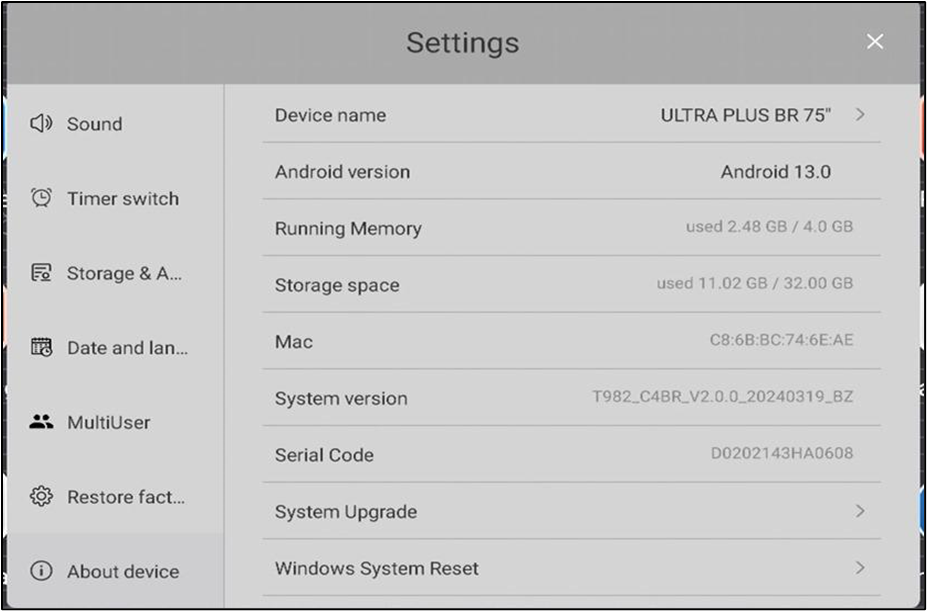
The following are the basic details of the Android, such as the Android version the system is running and the Storage of the device
ନିମ୍ନଲିଖିତଗୁଡ଼ିକ ହେଉଛି ଆଣ୍ଡ୍ରଏଡ୍ର ମୌଳିକ ବିବରଣୀ, ଯେପରିକି ସିଷ୍ଟମ୍ ଚାଲୁଥିବା ଆଣ୍ଡ୍ରଏଡ୍ ଭର୍ସନ୍ ଏବଂ ଡିଭାଇସର ଷ୍ଟୋରେଜ୍
| Component | Specification |
|---|---|
| ROM | 32GB Memory |
| RAM | 4 GB |
| Operating System | Android 13 |
2. Ports (ପୋର୍ଟ)
The IFP Display has multiple ports available to connect different accessories and equipment for better teaching experience.
ଉତ୍ତମ ଶିକ୍ଷାଦାନ ଅଭିଜ୍ଞତା ପାଇଁ ବିଭିନ୍ନ ଆନୁଷଙ୍ଗିକ ଏବଂ ଯନ୍ତ୍ରପାତି ସଂଯୋଗ କରିବାକୁ IFP ପ୍ରଦର୍ଶନରେ ଏକାଧିକ ପୋର୍ଟ ଉପଲବ୍ଧ |

Ports are available at the front of IFP Display (IFP ଡିସପ୍ଲେର ସମ୍ମୁଖ ଭାଗରେ ପୋର୍ଟଗୁଡ଼ିକ ଉପଲବ୍ଧ।)
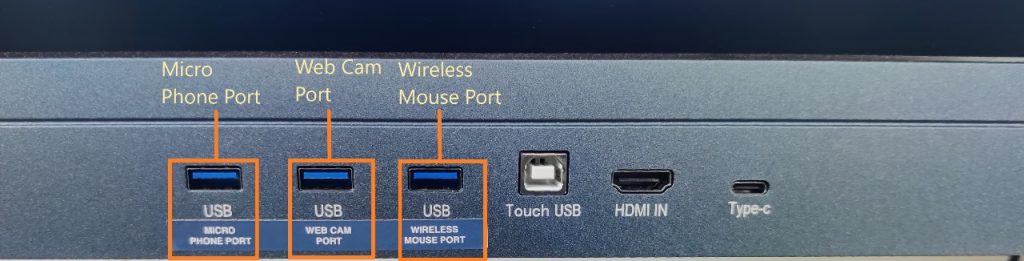
For better user friendliness, we have defined the use of each USB port (ଉନ୍ନତ ବ୍ୟବହାରକାରୀ ବନ୍ଧୁତ୍ୱ ପାଇଁ, ଆମେ ପ୍ରତ୍ୟେକ USB ପୋର୍ଟର ବ୍ୟବହାରକୁ ପରିଭାଷିତ କରିଛୁ)
3. Modes (ମୋଡ୍ଗୁଡ଼ିକ)
- The IFP display can be used in two modes; 1. Android Version; 2. Windows Version.
- IFP ପ୍ରଦର୍ଶନକୁ ଦୁଇଟି ମୋଡରେ ବ୍ୟବହାର କରାଯାଇପାରିବ; 1. ଆଣ୍ଡ୍ରଏଡ୍ ସଂସ୍କରଣ; 2. ୱିଣ୍ଡୋ
- The IFP display comes inbuilt with the Android operating system, whereas we can attach an OPS at the designated place in the back panel.
- IFP display Android operating system ସହିତ ନିର୍ମିତ, ଯେତେବେଳେ କି ଆମେ ପଛ ପ୍ୟାନେଲରେ ନିର୍ଦ୍ଦିଷ୍ଟ ସ୍ଥାନରେ ଏକ OPS ସଂଲଗ୍ନ କରିପାରିବା |
4. Controls (ନିୟନ୍ତ୍ରଣଗୁଡ଼ିକ)
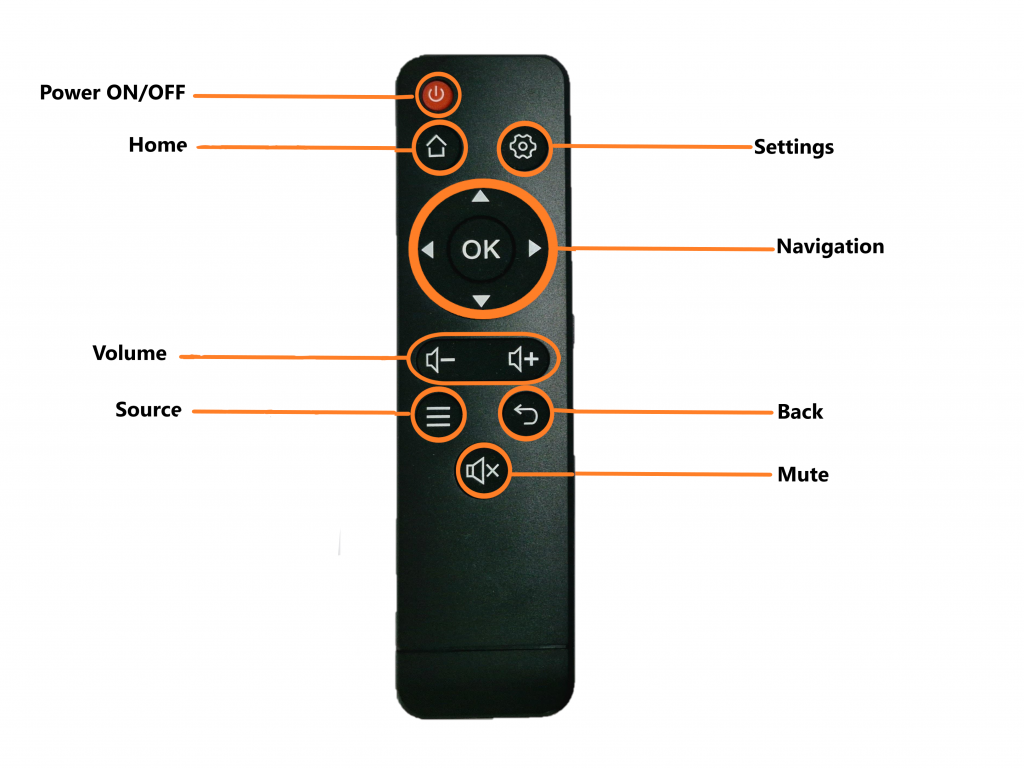
Remote (ରିମୋଟ୍)
- Power – To turn ON/OFF the IFP Display
- Home – Navigates to Home screen of IFP display
- Settings – To open settings window
- Navigation & OK – To navigate to different Pages, applications and other Media and OK button works as an ENTER button
- Volume – To increase/decrease the speaker sound in the IFP display
- Source – It helps in switching between different modes like OPS, HDMI and Android.
- Back – This button navigates us to go back/previous action.
- Mute – This button mutes the sound of the IFP display.
- Power – IFP ଡିସପ୍ଲେକୁ ଚାଲୁ/ବନ୍ଦ କରିବା ପାଇଁ
- Home – IFP ଡିସ୍ପ୍ଲେର Home screenକୁ ଯିବା ପାଇଁ।
- Settings – Settings ବିନ୍ଦୁ ଖୋଲିବା ପାଇଁ।
- Navigation & OK – ପୃଷ୍ଠା, ଆବେଦନପତ୍ର ଏବଂ ଅନ୍ୟାନ୍ୟ ମାଧ୍ୟମକୁ navigate କରିବା ପାଇଁ, ଏବଂ OK ବଟନ୍ ENTER ଭାବେ କାମ କରେ।
- Volume – IFP ଡିସ୍ପ୍ଲେର speaker soundକୁ ବଢ଼ାଇବା କିମ୍ବା କମାଇବା ପାଇଁ।
- Source – ଏହା OPS, HDMI, ଓ Android ଭଳି ଭିନ୍ନ ମୋଡ୍ ବଦଳାଇବାକୁ ସାହାଯ୍ୟ କରେ।
- Back – ପୂର୍ବ କ୍ରିୟାକୁ navigate କରି go back କରିବା ପାଇଁ।
- Mute – ଏହି ବଟନ୍ IFP ଡିସ୍ପ୍ଲେର ଶବ୍ଦକୁ mute କରିବା ପାଇଁ।
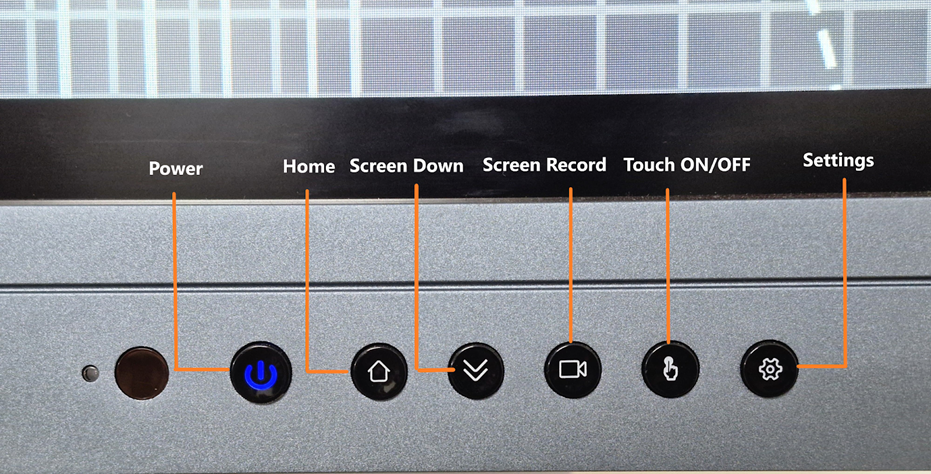
Buttons (ବଟନ୍ଗୁଡ଼ିକ)
- Power button – To turn ON/OFF the IFP display. Lock press to turn off when it’s ON
- Home – Navigates to home screen from any window
- Screen Down – It helps with better accessibility to the top of the screen by reducing screen size.
- Screen Record – It helps record the activity on the Screen
- Touch – It helps with enabling/disabling the touch function
- Settings – The button opens the settings window.
- Power button – IFP ଡିସ୍ପ୍ଲେକୁ ON/OFF କରିବା ପାଇଁ। ଏହା ଆଗରୁ ON ଥାଇଲେ, lock press କରି turn off କରିପାରିବେ।
- Home – ଯେକୌଣସି ଜାଗାରୁ home screen କୁ ଯାଇବାକୁ ସହାଯ୍ୟ କରେ।
- Screen Down – ଏହା screen size କୁ କମାଇ ଉପର ପାଟକୁ ସୁବିଧାଜନକ ଭାବେ ପହଁଚିବାରେ ସାହାଯ୍ୟ କରେ।
- Screen Record – ଏହା screen ଉପରେ ଘଟିଥିବା କାର୍ଯ୍ୟକୁ ରେକର୍ଡ କରିବାରେ ସାହାଯ୍ୟ କରେ।
- Touch – Touch function କୁ enable/disable କରିବାରେ ସାହାଯ୍ୟ କରେ।
- Settings – ଏହି ବଟନ୍ settings window ଖୋଲିବା ପାଇଁ।
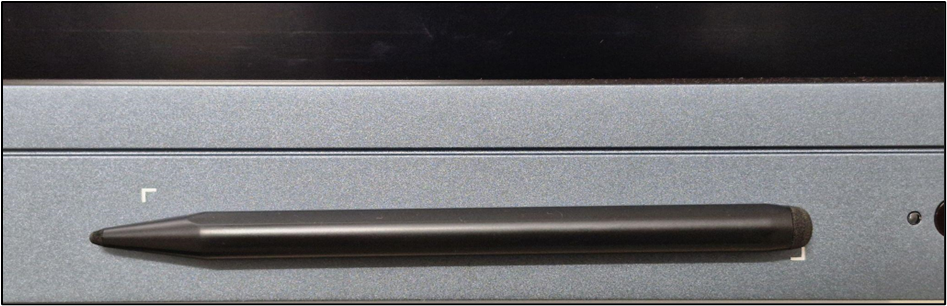
STYLUS/TOUCH PEN – Helps as an Input device; touch functions.
STYLUS/TOUCH PEN – ଏକ input device ଭାବରେ କାମ କରେ, ଏବଂ touch functions ପାଇଁ ସହାଯ୍ୟ କରେ।
5. Software and Connectivity (ସଫ୍ଟୱେର୍ ଏବଂ ସଂଯୋଗ)
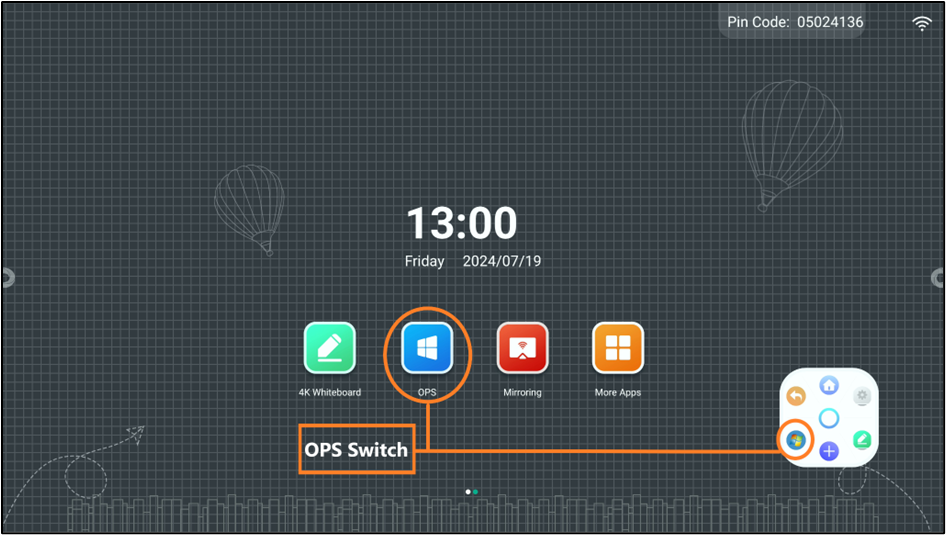
IFP to OPS – SWITCH BUTTONS. (IFP ରୁ OPS – ସୁଇଚ୍ ବଟନ୍ଗୁଡ଼ିକ)
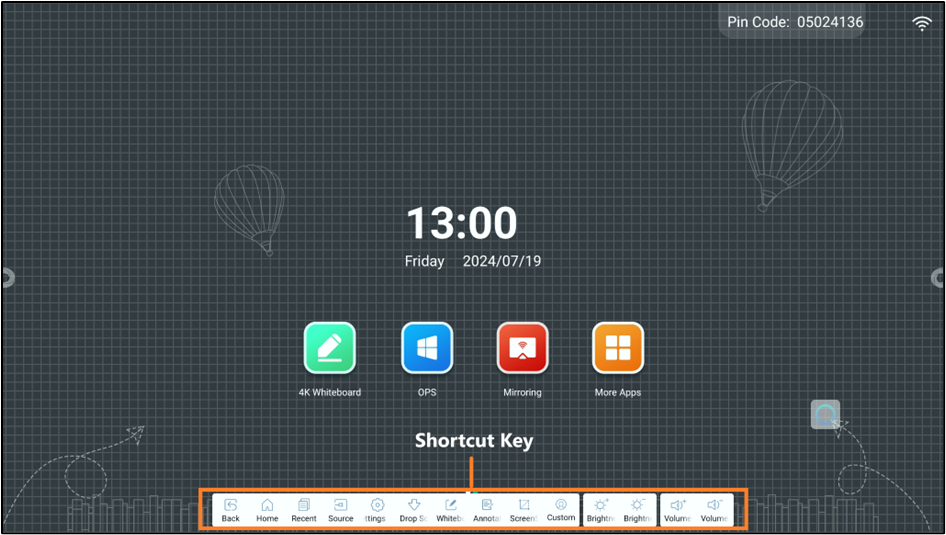
SHORTCUT BAR (ସର୍ଟକଟ୍ ବାର୍)
SIDE – CONTROL PANEL/BAR (ପାର୍ଶ୍ୱ – ନିୟନ୍ତ୍ରଣ ପ୍ୟାନେଲ୍/ବାର୍)
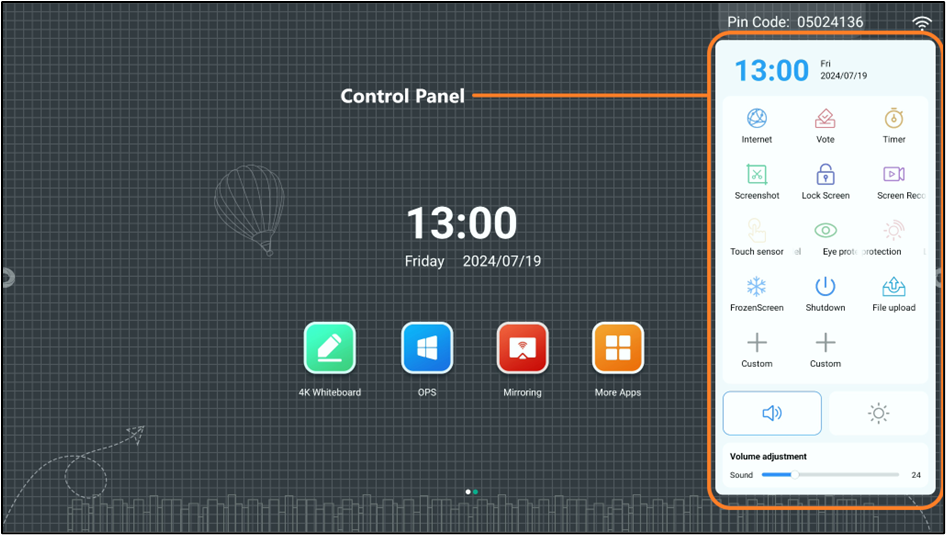
Wi-Fi SETTINGS (ୱାଇ-ଫାଇ ସେଟିଂସ୍)
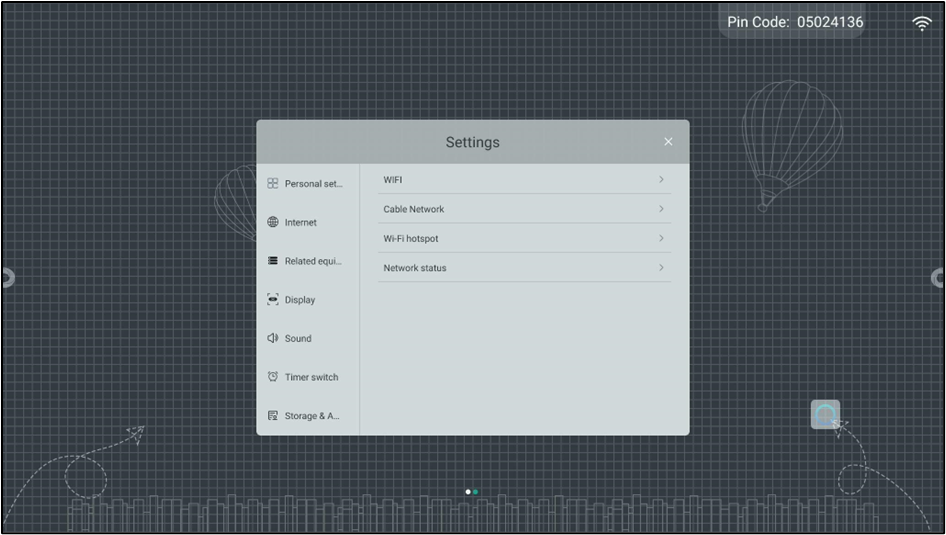
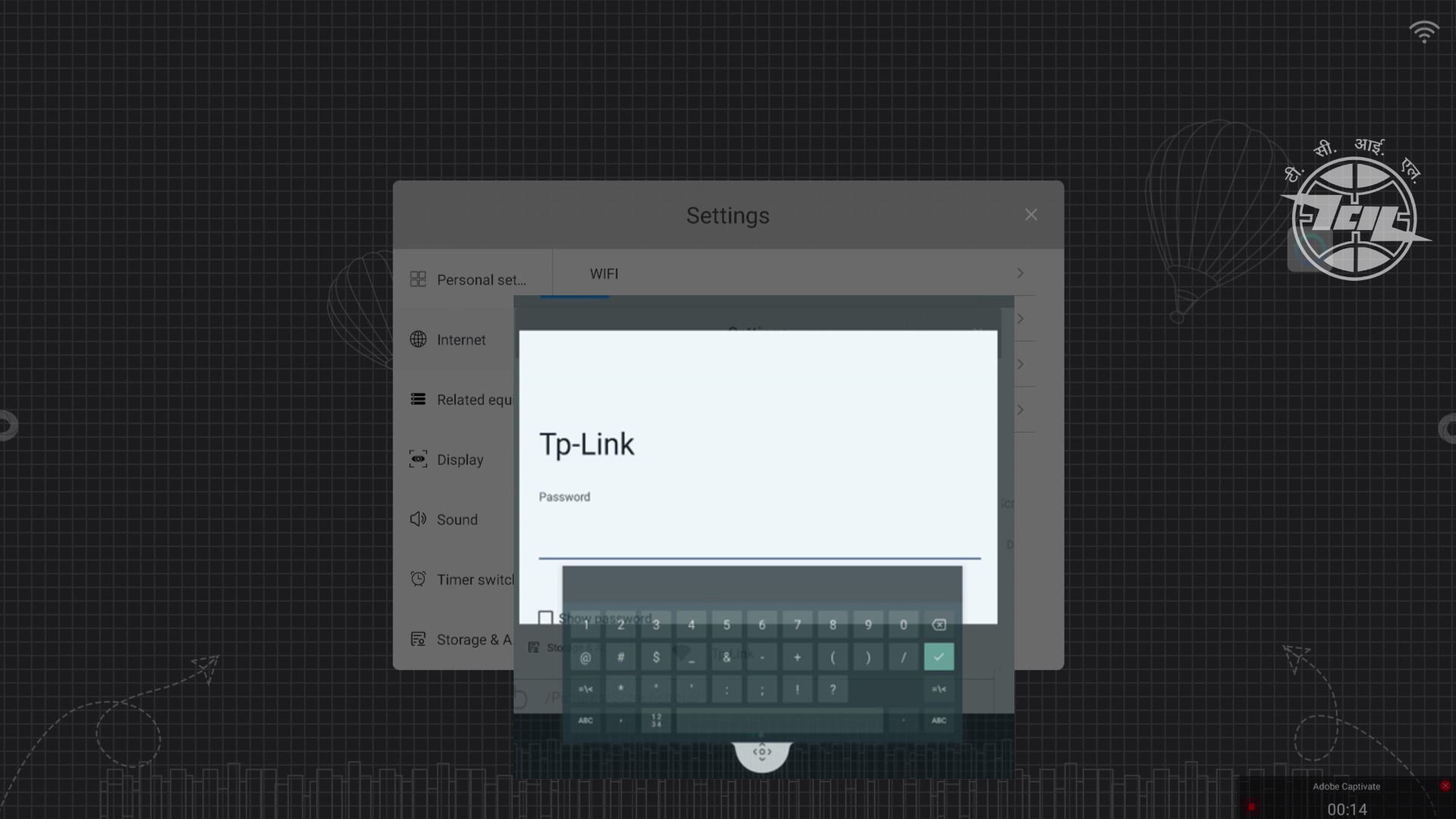
ADDING A NEW NETWORK (ଏକ ନୂତନ ନେଟୱାର୍କ ଯୋଡିବା )
Once you click on the Wi-Fi option, a list of available networks will appear. You can select your desired network, enter the required information, and connect to it.
desired network, enter the required information, and connect to it
Wi-Fi ବିକଳ୍ପରେ click କଲାପରେ, ଉପଲବ୍ଧ ନେଟୱାର୍କଗୁଡ଼ିକର ଏକ ତାଲିକା ଦେଖାଯିବ। ଆପଣ ନିଜର ପସନ୍ଦ କରା ନେଟୱାର୍କକୁ ଚୟନ କରି, ଆବଶ୍ୟକ ତଥ୍ୟ ଦିଅନ୍ତୁ ଏବଂ ଏହାକୁ connect କରନ୍ତୁ।
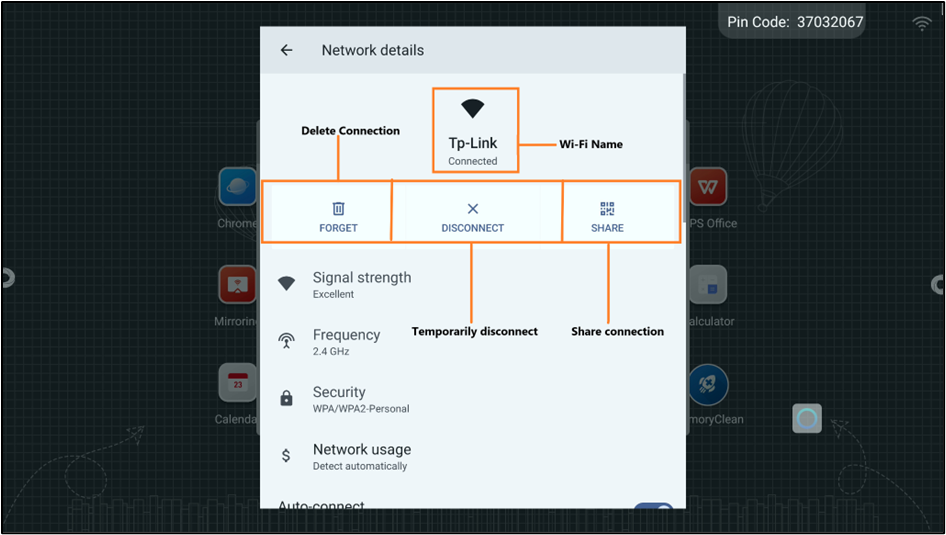
CONNECTED NETWORK – DETAILS (ସଂଯୁକ୍ତ ନେଟୱାର୍କ – ବିବରଣୀ)
6. Applications (ଆପ୍ଲିକେସନ୍ଗୁଡ଼ିକ)
The following is a list of basic applications which come pre-installed; you can download any other necessary application from Play store.
ନିମ୍ନଲିଖିତ ହେଉଛି pre-installed ଆସୁଥିବା କିଛି ମୂଳଭୂତ ଆବେଦନପତ୍ରଗୁଡ଼ିକର ତାଲିକା; ଆପଣ Play Store ରୁ ଆଉ ଯେକୌଣସି ଆବଶ୍ୟକ ଆବେଦନପତ୍ର ଡାଉନଲୋଡ୍ କରିପାରିବେ।
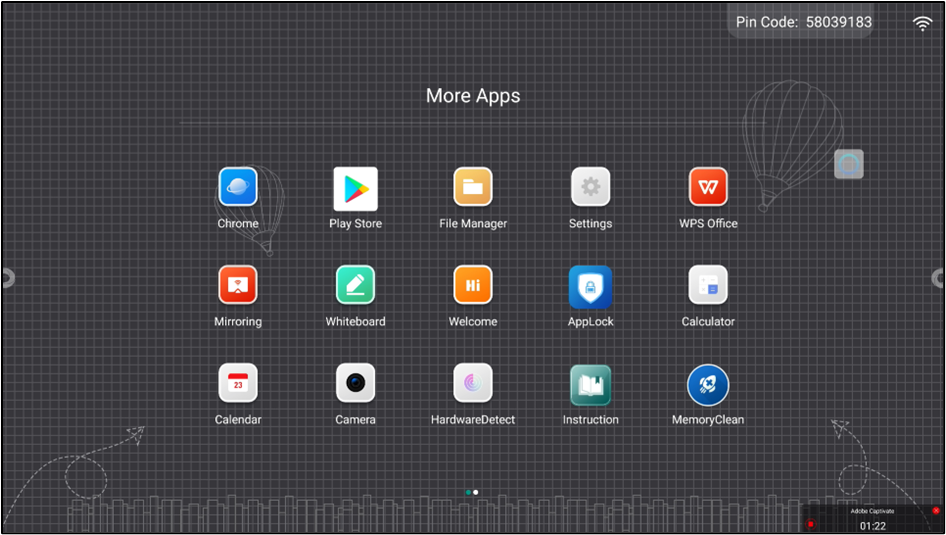
List if applications and their functions: (ପ୍ରୟୋଗଗୁଡ଼ିକର ତାଲିକା ଏବଂ ସେମାନଙ୍କର କାର୍ଯ୍ୟ)
| App Icon | Description |
|---|---|
  | Chrome is a web browser developed by Google. It is designed for speed, simplicity, and security. Chrome provides a clean user interface and integrates features like Google search and Google services, making it easy to browse the web, manage bookmarks, and access various extensions for enhanced functionality Chrome ଗୁଗୁଲ୍ ଦ୍ୱାରା ବିକଶିତ ହୋଇଥିବା ଏକ web browser ଅଟେ। ଏହାକୁ speed, simplicity, ଓ security ର ଧ୍ୟାନ ରଖି ଡିଜାଇନ୍ କରାଯାଇଛି। Chrome ସରଳ user interface ପ୍ରଦାନ କରେ ଓ Google search ଏବଂ ଗୁଗୁଲ୍ ସେବାଗୁଡ଼ିକ ସହିତ ସମାନ୍ତାର କରେ, ଯାହାକି web browsing, bookmarks ପ୍ରବନ୍ଧନ ଏବଂ ବିଭିନ୍ନ extensions ମାଧ୍ୟମରେ ଅଧିକ କାର୍ଯ୍ୟକ୍ଷମତାକୁ ସହଜ କରିଥାଏ। |
  | The Play Store is an online marketplace developed by Google for Android devices. It provides access to a wide range of digital content, including apps, games, music, movies, TV shows, books, and more. Users can browse, download, and install applications directly on their Android devices. Play Store ଗୁଗୁଲ୍ ଦ୍ୱାରା ଆଣ୍ଡ୍ରୋଇଡ୍ ଡିଭାଇସ୍ ମାନଙ୍କ ପାଇଁ ବିକଶିତ ହୋଇଥିବା ଏକ ଅନଲାଇନ୍ ବାଜାର ଅଟେ। ଏହା ଆପ୍ସ, ଖେଳ, ସଙ୍ଗୀତ, ଚଳଚ୍ଚିତ୍ର, TV shows, books ଏବଂ ଅନ୍ୟାନ୍ୟ ବିଭିନ୍ନ digital content ରେ ପହଁଚ ଯୋଗାଇଥାଏ। ବ୍ୟବହାରକାରୀମାନେ ସେଥିରୁ apps ଅନ୍ତର୍ଭୁକ୍ତ କରି ବିଭିନ୍ନ digital contentକୁ ଗୁଜାରି, download କରି ଏବଂ ସୋରସରି ତାଙ୍କର ଆଣ୍ଡ୍ରୋଇଡ୍ ଡିଭାଇସ୍ ଉପରେ install କରିପାରନ୍ତି। 4o |
  | A file manager is a software application that provides a user interface to manage files and folders on a computer or mobile device. It allows users to perform tasks such as creating, opening, copying, moving, renaming, and deleting files and directories. File manager ହେଉଛି ଏକ ସଫ୍ଟୱେର ଆବେଦନ, ଯାହା ଏକ user interface ଯୋଗାଇଥାଏ, ଯେଉଁଥିରେ କମ୍ପ୍ୟୁଟର କିମ୍ବା ମୋବାଇଲ୍ ଡିଭାଇସ୍ ଉପରେ files ଓ folders ପ୍ରବନ୍ଧନ କରାଯାଇଥାଏ। ଏହା ବ୍ୟବହାରକାରୀମାନଙ୍କୁ files ଓ directories ସହିତ create, open, copy, move, rename, ଏବଂ delete ଭଳି କାମକାଜ କରିବାକୁ ସହାଯ୍ୟ କରେ। |
  | The Settings app is a system application on computers, smartphones, and tablets that allows users to configure and customize their device’s preferences and functionalities. It provides access to various system options and controls, including Network, Bluetooth, Display, Sound, etc. Settings app ହେଉଛି କମ୍ପ୍ୟୁଟର, ସ୍ମାର୍ଟଫୋନ୍, ଏବଂ ଟ୍ୟାବ୍ଲେଟ୍ ଉପରେ ଏକ ସିଷ୍ଟମ୍ ଆବେଦନ, ଯାହା ବ୍ୟବହାରକାରୀମାନେ ତାଙ୍କର ଡିଭାଇସ୍ର preferences ଏବଂ functionalities କୁ ସଂକଳନ କରିବା ଓ କଷ୍ଟମାଇଜ୍ କରିବାକୁ ସହାଯ୍ୟ କରେ। ଏହା ନେଟୱାର୍କ, Bluetooth, Display, Sound ଇତ୍ୟାଦି ଭିନ୍ନ ସିଷ୍ଟମ୍ ବିକଳ୍ପ ଏବଂ ନିୟନ୍ତ୍ରଣକୁ ପହଁଚ ଯୋଗାଇଥାଏ। |
  | The WPS Office allows you to create, edit, and view documents, spreadsheets, presentations, and PDFs for free. The interface is similar to Microsoft Office, making it easy to use. WPS Office ଆପଣଙ୍କୁ ମୁକ୍ତରେ documents, spreadsheets, presentations, ଏବଂ PDFs ବନାଇବା, ସଂଶୋଧନ କରିବା ଓ ଦେଖିବାକୁ ସହାଯ୍ୟ କରେ। ଏହାର interface ମାଇକ୍ରୋସଫ୍ଟ୍ ଓଫିସ୍ ସହିତ ସଦୃଶ, ଯାହାକି ବ୍ୟବହାର କରିବାକୁ ସହଜ କରେ। |
  | Screen mirroring is a technology that allows you to duplicate the display of your computer, smartphone, or tablet onto another screen, such as IFP display. This enables you to share content, such as videos, photos, presentations, or any other visible data, in real-time Screen mirroring ହେଉଛି ଏକ ପ୍ରଯୁକ୍ତି, ଯାହା ଆପଣଙ୍କୁ ତାଙ୍କର କମ୍ପ୍ୟୁଟର, ସ୍ମାର୍ଟଫୋନ୍, କିମ୍ବା ଟ୍ୟାବ୍ଲେଟ୍ ର ଡିସ୍ପ୍ଲେକୁ ଅନ୍ୟ ଏକ ସ୍କ୍ରିନ୍, ଯଥା IFP display ଉପରେ ନକଲ କରିବାକୁ ସହାଯ୍ୟ କରେ। ଏହା ଆପଣଙ୍କୁ ଏକ ସମୟରେ videos, photos, presentations, କିମ୍ବା କୌଣସି ଅନ୍ୟ visible data ଆଦି ସେୟାର କରିବାକୁ ସହାଯ୍ୟ କରେ। |
  | A 4K whiteboard app for teaching is a digital application designed to leverage the high resolution of 4K displays to enhance the educational experience. It provides a virtual workspace where teachers can write, draw, and present information with exceptional clarity. 4K whiteboard app ପାଇଁ ଏକ ଡିଜିଟାଲ୍ ଆବେଦନ, ଯାହା 4K displays ର ଉଚ୍ଚ ରିଜୋଲୁସନ୍ କୁ ବ୍ୟବହାର କରି ଶିକ୍ଷା ପ୍ରନାଳୀକୁ ସୁଧାରିବା ପାଇଁ ଡିଜାଇନ୍ କରାଯାଇଛି। ଏହା ଏକ ଭର୍ଚୁଆଲ୍ workspace ପ୍ରଦାନ କରେ, ଯେଉଁଥିରେ ଶିକ୍ଷକମାନେ ଲେଖିପାରିବେ, ଚିତ୍ର ତାଳିବେ, ଏବଂ ସୂଚନା ପ୍ରଦାନ କରିବେ ଅସାଧାରଣ ସ୍ଫଷ୍ଟତା ସହିତ। |
  | The application helps teachers design interactive documents similar to PowerPoint. It helps teachers make learning more interactive. Application ଶିକ୍ଷକମାନେ ମାଇକ୍ରୋସଫ୍ଟ୍ PowerPoint ସହିତ ସମାନ interactive documents ଡିଜାଇନ୍ କରିବାରେ ସହାଯ୍ୟ କରେ। ଏହା ଶିକ୍ଷକମାନେ ଶିକ୍ଷାକୁ ଅଧିକ interactive ବନେଇବାକୁ ସାହାଯ୍ୟ କରେ। |
  | App Lock is a security feature or app that adds an extra layer of protection to your IFP display. This prevents unauthorized users from accessing your sensitive information. App Lock ହେଉଛି ଏକ ସୁରକ୍ଷା ବିଶେଷତା କିମ୍ବା ଆବେଦନ, ଯାହା ଆପଣଙ୍କର IFP display ରେ ଏକ ଅତିରିକ୍ତ ସୁରକ୍ଷା ଯୋଗ କରେ। ଏହା ଅନଧିକୃତ ବ୍ୟବହାରକାରୀଙ୍କୁ ଆପଣଙ୍କର ସେନ୍ସିଟିଭ୍ ସୂଚନାକୁ ପହଁଚ କରିବାରୁ ରୋକିଥାଏ। |
  | It helps in performing basic arithmetic (addition, subtraction, multiplication, and division) and more complex calculations like percentages, exponents, and even trigonometry. So, we can save time and effort on manual calculations. ଏହା ମୌଳିକ ଗଣନା (ଯୋଗ, ବିୟୋଗ, ଗୁଣା, ଓ ବିଭାଜନ) କରିବାରେ ସହାଯ୍ୟ କରେ ଏବଂ ଅଧିକ କମ୍ପ୍ଲେକ୍ସ ଗଣନା, ଯଥା ପ୍ରତିଶତ, ବିଶ୍ମୟ, ଓ ଟ୍ରିଗୋନୋମେଟ୍ରୀ ମଧ୍ୟ କରିବାରେ ସାହାଯ୍ୟ କରେ। ସେହିପରି, ଆମେ ହାତଦ୍ୱାରା ଗଣନାରେ ସମୟ ଓ ପ୍ରୟାସ ସଞ୍ଚୟ କରିପାରିବା। |
  | Calendars define how we split years into months, weeks, and days. Calendars are tools to help us keep track of appointments, deadlines, events, birthdays, and anything else we need to remember. It helps you schedule events, set reminders, and keep your life organized.Calendars ବର୍ଷଗୁଡିକୁ ମାସ, ସପ୍ତାହ, ଓ ଦିନଗୁଡିକୁ କିପରି ବିଭାଜିତ କରିବାକୁ ସଂରୂପିତ କରେ। Calendars ଆମକୁ appointments, deadlines, events, birthdays, ଏବଂ ଆମେ ମନେ ରଖିବାକୁ ଆବଶ୍ୟକ ହେବାରୁ ଯେକୌଣସି ଅନ୍ୟ କାମ ଟ୍ରାକ୍ କରିବାକୁ ସାହାଯ୍ୟ କରିଥାଏ। ଏହା ଆପଣଙ୍କୁ events କୁ ସ୍କେଜ୍ୟୁଲ୍ କରିବା, reminders ସେଟ୍ କରିବା, ଏବଂ ଆପଣଙ୍କର ଜୀବନକୁ ସଂଗଠିତ ରଖିବାରେ ସାହାଯ୍ୟ କରେ। |
  | The Camera app on your Android device is your go-to tool for capturing images and videos to improve teaching experience ଆପଣଙ୍କର ଆଣ୍ଡ୍ରୋଇଡ୍ ଡିଭାଇସ୍ ଉପରେ Camera app ହେଉଛି ଛବି ଏବଂ ଭିଡିଓ ଧରିବା ପାଇଁ ଆପଣଙ୍କର ପ୍ରାଥମିକ ଉପକରଣ, ଯାହା ଶିକ୍ଷା ଅନୁଭବକୁ ସୁଧାରିବାରେ ସହାଯ୍ୟ କରେ। |
  | The following application helps to check the status and condition of all the hardware components and identify any issues with them. ନିମ୍ନଲିଖିତ ଆବେଦନ ଆପଣଙ୍କୁ ସମସ୍ତ hardware components ର ଅବସ୍ଥା ଏବଂ ସ୍ଥିତି ଯାଞ୍ଚ କରିବାରେ ସାହାଯ୍ୟ କରେ ଏବଂ ତାଙ୍କ ସହିତ ଯେକୌଣସି ସମସ୍ୟା ପରିଚୟ କରିବାରେ ସହାଯ୍ୟ କରେ। |
  | Instruction application is a user manual that guides us on how to properly use the IFP Instruction application ହେଉଛି ଏକ ବ୍ୟବହାରକାରୀ ମାନୁଆଲ୍, ଯାହା ଆମକୁ IFP କୁ ସଠିକ୍ ଭାବରେ କିପରି ବ୍ୟବହାର କରିବା ବିଷୟରେ ଦିଗଦର୍ଶନ କରେ। |
  | “Memory clean” on Android doesn’t typically refer to a specific built-in feature but rather the general concept of freeing up RAM (Random Access Memory) to improve your IFP display performance. Android ରେ “Memory clean” ସାଧାରଣତଃ ଏକ ନିର୍ଦ୍ଧିଷ୍ଟ ନିର୍ମିତ ବିଶେଷତାକୁ ନୁହେଁ, ବରଂ ଏହା IFP display କାର୍ଯ୍ୟକ୍ଷମତାକୁ ସୁଧାରିବା ପାଇଁ RAM (Random Access Memory) କୁ ମୁକ୍ତ କରିବାର ମାଧ୍ୟମରେ ଗ୍ରାହକ ଆଭାସର ଏକ ସାଧାରଣ ସୂତ୍ରଧାରା କୁ ବ୍ୟବହାର କରେ। |
  | Microsoft Teams is a collaboration platform designed to streamline communication and teamwork within organizations. Teams lets you chat with individuals or groups, conduct video calls with colleagues, and even host online meetings with screen sharing capabilities. Microsoft Teams ହେଉଛି ଏକ ସହଯୋଗ ପ୍ଲାଟଫର୍ମ, ଯାହା ସଂସ୍ଥାଗତରେ ସଂପ୍ରେଷଣ ଏବଂ ସହକାରୀତାକୁ ସହଜ କରିବା ପାଇଁ ଡିଜାଇନ୍ କରାଯାଇଛି। Teams ଆପଣଙ୍କୁ ବ୍ୟକ୍ତିଗତ କିମ୍ବା ଗୋଷ୍ଠୀ ସହିତ ଚାଟ୍ କରିବା, ସହକର୍ମୀଙ୍କ ସହିତ ଭିଡିଓ କଲ୍ କରିବା, ଏବଂ ସ୍କ୍ରିନ୍ ସେୟାରିଂ ସକ୍ଷମତା ସହିତ ଅନଲାଇନ୍ ମିଟିଂଗୁଡିକୁ ଆୟୋଜନ କରିବାକୁ ସହାଯ୍ୟ କରେ। |
  | Vridhee LMS (Learning Management System) is a software application used to plan, deliver, and manage educational courses or training programs. It helps educators create and organize course content, track student progress, and facilitate communication between teachers and students. Essentially, it’s a digital platform that streamlines the learning process. Vridhee LMS (Learning Management System) ହେଉଛି ଏକ ସଫ୍ଟୱେର ଆବେଦନ, ଯାହା ଶିକ୍ଷାତ୍ମକ କୋର୍ସ କିମ୍ବା ପ୍ରଶିକ୍ଷଣ କାର୍ଯ୍ୟକ୍ରମଗୁଡିକୁ ଯୋଜନା, ବିତରଣ, ଏବଂ ପ୍ରବନ୍ଧନ କରିବା ପାଇଁ ବ୍ୟବହୃତ ହୁଏ। ଏହା ଶିକ୍ଷକମାନେ କୋର୍ସ ବିଷୟବସ୍ତୁ ତିଆରି କରିବା, ଛାତ୍ର ଉନ୍ନତି ଟ୍ରାକ୍ କରିବା, ଏବଂ ଶିକ୍ଷକ ଓ ଛାତ୍ରଙ୍କର ମଧ୍ୟରେ ସଂପ୍ରେଷଣ ସୁସ୍ଥିତ କରିବାରେ ସାହାଯ୍ୟ କରେ। ସାରା ଭାବେ, ଏହା ଶିକ୍ଷା ପ୍ରକ୍ରିୟାକୁ ସହଜ କରୁଥିବା ଏକ ଡିଜିଟାଲ୍ ପ୍ଲାଟଫର୍ମ। |
  | Vridhee LMS offline is similar to the Vridhee LMS application, the difference being that this application can be used offline, and the usage and activities sync once the internet is connected. Vridhee LMS (Learning Management System) ହେଉଛି ଏକ ସଫ୍ଟୱେର ଆବେଦନ, ଯାହା ଶିକ୍ଷାତ୍ମକ କୋର୍ସ କିମ୍ବା ପ୍ରଶିକ୍ଷଣ କାର୍ଯ୍ୟକ୍ରମଗୁଡିକୁ ଯୋଜନା, ବିତରଣ, ଏବଂ ପ୍ରବନ୍ଧନ କରିବା ପାଇଁ ବ୍ୟବହୃତ ହୁଏ। ଏହା ଶିକ୍ଷକମାନେ କୋର୍ସ ବିଷୟବସ୍ତୁ ତିଆରି କରିବା, ଛାତ୍ର ଉନ୍ନତି ଟ୍ରାକ୍ କରିବା, ଏବଂ ଶିକ୍ଷକ ଓ ଛାତ୍ରଙ୍କର ମଧ୍ୟରେ ସଂପ୍ରେଷଣ ସୁସ୍ଥିତ କରିବାରେ ସାହାଯ୍ୟ କରେ। ସାରା ଭାବେ, ଏହା ଶିକ୍ଷା ପ୍ରକ୍ରିୟାକୁ ସହଜ କରୁଥିବା ଏକ ଡିଜିଟାଲ୍ ପ୍ଲାଟଫର୍ମ। |
  | Vridhee Track helps the teacher and management track the usage and other teaching activities on the LMS application. It works as a dashboard to track all activities. Vridhee LMS offline Vridhee LMS ଆବେଦନ ସହିତ ସମାନ, କିନ୍ତୁ ଏହାର ତଫାତ୍ ହେଉଛି ଯେ, ଏହି ଆବେଦନଟି ଅଫ୍ଲାଇନ୍ ବ୍ୟବହାର କରାଯାଇପାରିବ, ଏବଂ ଇଣ୍ଟର୍ନେଟ୍ ସଂଯୋଗ ହେବା ପରେ ବ୍ୟବହାର ଏବଂ କାର୍ଯ୍ୟଗୁଡିକୁ ସିଙ୍କ୍ କରାଯାଇଥାଏ। |
  | Zoom is a popular video conferencing platform that lets you connect with others virtually You can share your screen, use chat features, and even record meetings for later reference. Zoom ହେଉଛି ଏକ ପ୍ରସିଦ୍ଧ ଭିଡିଓ କନ୍ଫରେନ୍ସିଙ୍ଗ୍ ପ୍ଲାଟଫର୍ମ, ଯାହା ଆପଣଙ୍କୁ ଅନ୍ୟଙ୍କ ସହିତ ବର୍ତ୍ତମାନୀୟ ଭାବରେ ସଂଯୋଗ କରିବାକୁ ସହାଯ୍ୟ କରେ। |
7. Troubleshooting (ସମସ୍ୟା ନିବାରଣ)
Power and Basic Checks: (ପାୱାର ଏବଂ ମୌଳିକ ଯାଞ୍ଚ)
An Interactive Flat Panel (IFP) can experience various issues. Here’s a guide to troubleshooting common problems:
ଏକ Interactive Flat Panel (IFP) ବିଭିନ୍ନ ସମସ୍ୟା ଅନୁଭବ କରିପାରିବ | ସାଧାରଣ ସମସ୍ୟାଗୁଡିକର ସମାଧାନ ପାଇଁ ଏଠାରେ ଏକ ଗାଇଡ୍ ଅଛି:
Power Issues: (ବିଦ୍ୟୁତ୍ ସମସ୍ୟା)
Ensure the IFP is plugged in and turned on properly. Check the power cord for damage and try a different outlet. Verify that the LED indicator light reflects the correct power state (on, standby, etc).
ବିଦ୍ୟୁତ୍ ସମସ୍ୟା:
ନିଶ୍ଚିତ କରନ୍ତୁ ଯେ IFP ପ୍ଲଗ୍ ଇନ୍ ହୋଇଛି ଏବଂ ସଠିକ୍ ଭାବରେ ଅନ୍ ଅଛି | କ୍ଷତି ପାଇଁ ପାୱାର୍ କର୍ଡ ଯାଞ୍ଚ କରନ୍ତୁ ଏବଂ ଏକ ଭିନ୍ନ outlet ଚେଷ୍ଟା କରନ୍ତୁ | ଯାଞ୍ଚ କରନ୍ତୁ ଯେ LED ସୂଚକ ଆଲୋକ ସଠିକ୍ ଶକ୍ତି ସ୍ଥିତିକୁ ପ୍ରତିଫଳିତ କରେ (ଅନ୍, ଷ୍ଟାଣ୍ଡବାଇ, ଇତ୍ୟାଦି) |
Input Source:
Ensure the IFP is plugged in and turned on properly. Check the power cord for damage and try a different outlet. Verify that the LED indicator light reflects the correct power state (on, standby, etc).
ନିବେଶ ଉତ୍ସ:
ନିଶ୍ଚିତ କରନ୍ତୁ ଯେ IFP ବିଦ୍ୟୁତ୍ ସହ ସଂଯୋଗ କରାଯାଇଅଛି ଏବଂ ସଠିକ୍ ଭାବରେ ଅନ୍ ଅଛି | କ୍ଷତି ପାଇଁ ପାୱାର୍ କର୍ଡ ଯାଞ୍ଚ କରନ୍ତୁ ଏବଂ ଏକ ଭିନ୍ନ outlet ଚେଷ୍ଟା କରନ୍ତୁ | ଯାଞ୍ଚ କରନ୍ତୁ ଯେ LED ସୂଚକ ଆଲୋକ ସଠିକ୍ ଶକ୍ତି ସ୍ଥିତିକୁ ପ୍ରତିଫଳିତ କରେ (on, standby, ଇତ୍ୟାଦି) |
Remote Control:
Ensure the IFP is plugged in and turned on properly. Check the power cord for damage and try a different outlet. Verify that the LED indicator light reflects the correct power state (on, standby, etc).
ରିମୋଟ୍ କଣ୍ଟ୍ରୋଲ୍:
ନିଶ୍ଚିତ କରନ୍ତୁ ଯେ IFP ପ୍ଲଗ୍ ଇନ୍ ହୋଇଛି ଏବଂ ଠିକ୍ ଭାବରେ ଚାଲୁ ହୋଇଛି। କ୍ଷତି ପାଇଁ ପାୱାର କର୍ଡ ଯାଞ୍ଚ କରନ୍ତୁ ଏବଂ ଏକ ଭିନ୍ନ ଆଉଟଲେଟ୍ ଚେଷ୍ଟା କରନ୍ତୁ। ଯାଞ୍ଚ କରନ୍ତୁ ଯେ LED ସୂଚକ ଆଲୋକ ସଠିକ୍ ପାୱାର ସ୍ଥିତି (ଚାଲୁ, ଷ୍ଟାଣ୍ଡବାଏ, ଇତ୍ୟାଦି) ପ୍ରତିଫଳିତ କରୁଛି।
Display Issues: (ପ୍ରଦର୍ଶନ ସମସ୍ୟାଗୁଡ଼ିକ)
No Picture
Verify the connection between the IFP and the source device is secure (check cables for damage).Try a different cable (e.g., HDMI) to rule out a faulty cable. Ensure the source device is powered on and functioning correctly.
ଛବି ନାହିଁ:
IFP ଏବଂ ଉତ୍ସ ଉପକରଣ ମଧ୍ୟରେ ସଂଯୋଗକୁ ଯାଞ୍ଚ କରନ୍ତୁ ସୁରକ୍ଷିତ (କ୍ଷତି ପାଇଁ କେବୁଲ ଯାଞ୍ଚ କରନ୍ତୁ) ଏକ ତ୍ରୁଟିପୂର୍ଣ୍ଣ କେବୁଲକୁ ଏଡ଼ାଇବା ପାଇଁ ଏକ ଭିନ୍ନ କେବୁଲ୍ ଚେଷ୍ଟା କରନ୍ତୁ (ଯଥା, HDMI) | ଉତ୍ସ ନିଶ୍ଚିତ କରନ୍ତୁ ଡିଭାଇସ୍ ଚାଳିତ ଏବଂ ସଠିକ୍ ଭାବରେ କାର୍ଯ୍ୟ କରୁଛି
Picture Quality
Adjust the picture settings on the IFP using the on-screen menu (brightness, contrast, etc.) Check the resolution settings of both the IFP and the source device for compatibility.
ଛବି ଗୁଣବତ୍ତା:
on-screen menu (ଉଜ୍ଜ୍ୱଳତା, ବିପରୀତ, ଇତ୍ୟାଦି) ବ୍ୟବହାର କରି IFP ରେ ଚିତ୍ର ସେଟିଂସମୂହ Adjust କରନ୍ତୁ | ସୁସଙ୍ଗତତା ପାଇଁ ଉଭୟ IFP ଏବଂ ଉତ୍ସ ଉପକରଣର resolution ସେଟିଂସମୂହ ଯାଞ୍ଚ କରନ୍ତୁ |
Touchscreen Issues: (ଟଚସ୍କ୍ରିନ୍ ସମସ୍ୟା)
Unresponsive Touch
Clean the IFP screen with a soft, dry cloth (avoid harsh chemicals). Ensure your fingers are clean or styluses used are compatible and clean. Check the IFP’s touch settings in the on-screen menu for calibration or activation.
ପ୍ରତିକ୍ରିୟାହୀନ ସ୍ପର୍ଶ:
ଏକ ନରମ, ଶୁଖିଲା କପଡା ସହିତ IFP ପରଦାକୁ ସଫା କର (କଠିନ ରାସାୟନିକ ପଦାର୍ଥରୁ ଦୂରେଇ ରୁହ) | ନିଶ୍ଚିତ କରନ୍ତୁ ଯେ ଆପଣଙ୍କର ଆଙ୍ଗୁଠି ସଫା ଅଛି କିମ୍ବା ବ୍ୟବହୃତ styluses ସୁସଙ୍ଗତ ଏବଂ ପରିଷ୍କାର ଅଟେ | calibration କିମ୍ବା activation ପାଇଁ on-screen menu IFP ର ସ୍ପର୍ଶ ସେଟିଂସମୂହ ଯାଞ୍ଚ କରନ୍ତୁ |
Inaccurate Touch
Similar to unresponsive touch, ensure the screen is clean.
ଭୁଲ ସ୍ପର୍ଶ:
ପ୍ରତିକ୍ରିୟାଶୀଳ ସ୍ପର୍ଶ ପରି, ସ୍କ୍ରିନ୍ ସଫା ଅଛି ବୋଲି ନିଶ୍ଚିତ କରନ୍ତୁ
Software and connection issues: (ସଫ୍ଟୱେର୍ ଏବଂ ସଂଯୋଗ ସମସ୍ୟା)
Connectivity Issues (if applicable):
For network-related applications, verify a stable internet connection. Ensure Wi-Fi is enabled and connected to the correct network. Check for software updates.
ସଂଯୋଗ ସମସ୍ୟା (ଯଦି ପ୍ରଯୁଜ୍ୟ):
ନେଟୱର୍କ ସମ୍ବନ୍ଧୀୟ ପ୍ରୟୋଗଗୁଡ଼ିକ ପାଇଁ, ଏକ ସ୍ଥିର internet ସଂଯୋଗ ଯାଞ୍ଚ କରନ୍ତୁ | ନିଶ୍ଚିତ କରନ୍ତୁ ଯେ Wi-Fi ସକ୍ଷମ ଏବଂ ସଠିକ network ସହିତ ସଂଯୁକ୍ତ | software updates ପାଇଁ ଯାଞ୍ଚ କରନ୍ତୁ
8. Product Support (ଉତ୍ପାଦ ସମର୍ଥନ)
The IFP display is mapped to a serial number and a QR code, which can also be scanned for the product serial number. It is to be provided to the support staff during the lodging of a product issue/complaint for easy identification of the product.
IFP ଡିସପ୍ଲେ ଏକ କ୍ରମିକ ସଂଖ୍ୟା ଏବଂ ଏକ QR କୋଡ୍ ସହିତ ମ୍ୟାପ୍ ହୋଇଛି, ଯାହାକି ଉତ୍ପାଦ କ୍ରମିକ ସଂଖ୍ୟା ପାଇଁ ସ୍କାନ କରାଯାଇପାରିବ | ଉତ୍ପାଦର ସହଜ ଚିହ୍ନଟ ପାଇଁ ଏକ ଉତ୍ପାଦ ସମସ୍ୟା / ଅଭିଯୋଗର ରହଣି ସମୟରେ ଏହା ସହାୟକ କର୍ମଚାରୀଙ୍କୁ ପ୍ରଦାନ କରାଯିବ |
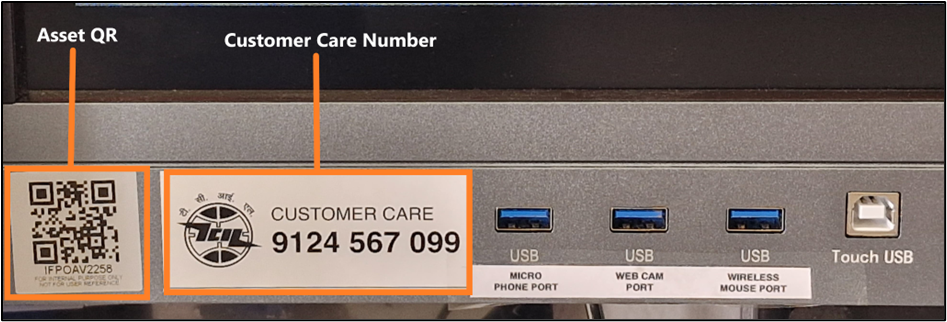
The product is provided with a customer care contact number. You can raise the product issue with the help of the serial number mentioned or by scanning the QR to fetch the serial number.
ଏହି ପ୍ରଡକ୍ଟ୍ ସହିତ ଏକ customer care ସଂପର୍କ ନମ୍ବର ଦିଆଯାଇଛି। ଆପଣ ଉଲ୍ଲେଖିତ serial number ର ସହାୟତାରେ କିମ୍ବା QR ସ୍କାନ୍ କରି ସେରିଆଲ୍ ନମ୍ବର ଉଠାଇ product issue ଉଦ୍ଧାର କରିପାରିବେ।
For any queries or further assistance, please contact our Customer Support:
- Phone: 9124 567 099
Email: helpdesk@ictschoollab.com