1. Overview (ସଂକ୍ଷିପ୍ତ ବିବରଣୀ)
1a. Purpose (ଉଦ୍ଦେଶ୍ୟ)
A wireless microphone system allows the user’s voice to be transmitted “wirelessly” to its receiver, located under the wall mount panel. The sound system amplifies the signal from the receiver and outputs it through the system’s speakers. The microphone is powered by a battery.
ଏକ ତାରହୀନ ମାଇକ୍ରୋଫୋନ୍ ସିଷ୍ଟମ୍ ବ୍ୟବହାରକାରୀଙ୍କର Voiceକୁ “wirelessly” ତାଙ୍କର receiver କୁ ପ୍ରସାରିତ କରିଥାଏ, ଏହା wall mount ପ୍ୟାନେଲ ଭିତରେ ଅଛି । Sound system receiverର ଧ୍ୱନି କୁ amplify ଦ୍ୱାରା ସ୍ଥାନାନ୍ତରିତ କରି ଧ୍ୱନିକୁ speakers ମାଧ୍ୟମରେ Output କରେ। Microphone ଏକ battery ଦ୍ୱାରା କାମ କରେ I

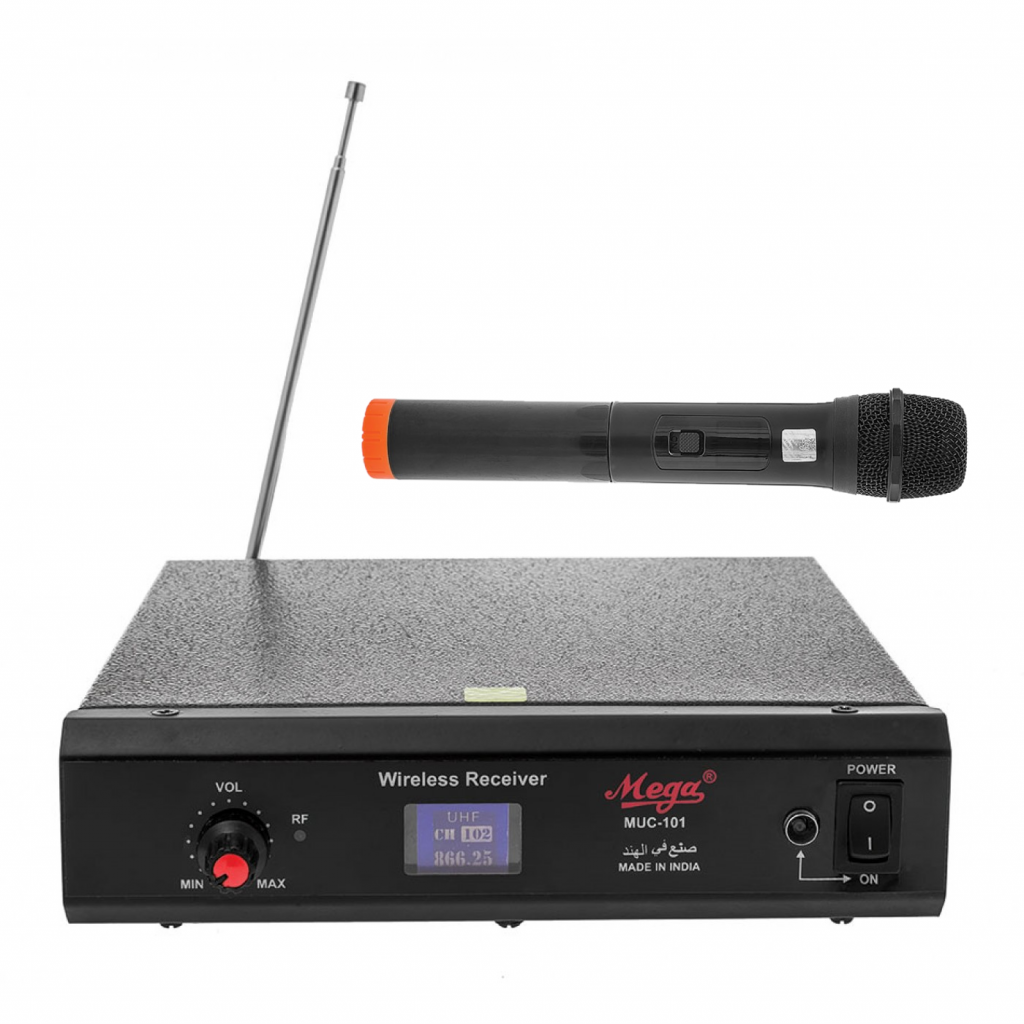
The set consists of a microphone, a wireless receiver, and an Aux to USB cable.
ତାରହୀନ ମାଇକ୍ରୋଫୋନ୍ ସିଷ୍ଟମ୍ ରେ ମାଇକ୍ରୋଫୋନ୍, ଏକ ତାରବିହୀନ ରିସିଭର୍, ଏବଂ ଏକ Aux to USB cable ରହିଛି।
1b. Connectivity (ସଂଯୋଗ)
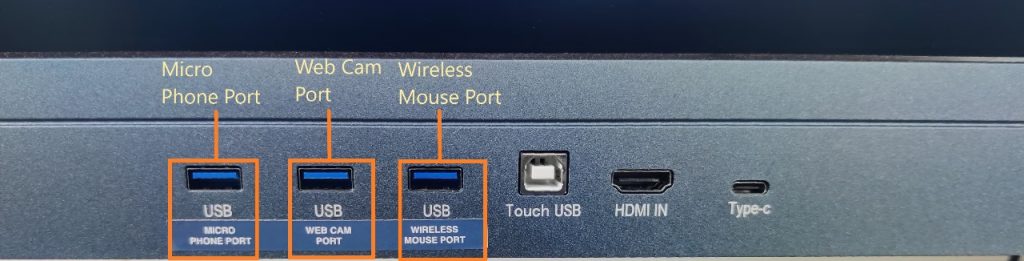
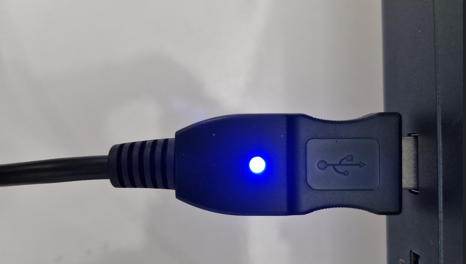
The microphone set comes with an auxiliary cable on one end and USB on the other. The USB is connected to the IFP display, and once plugged into the display, a blue light is turned on at the USB end.
ମାଇକ୍ରୋଫୋନ୍ ସେଟ୍ ସହିତ ଏକ ପକ୍ଷରେ ଏକ auxiliary କେବଲ୍ ଏବଂ ଅନ୍ୟ ପକ୍ଷରେ ଏକ USB ସହିତ ଆସିଥାଏ | USB IFP ଡିସପ୍ଲେ ସହିତ ସଂଯୁକ୍ତ, ଏବଂ ଥରେ IFP displayରେ ପ୍ଲଗ୍ ହୋଇଗଲେ, USB ରେ ଏକ ନୀଳ ଆଲୋକ ଜଳିଉଠେ |
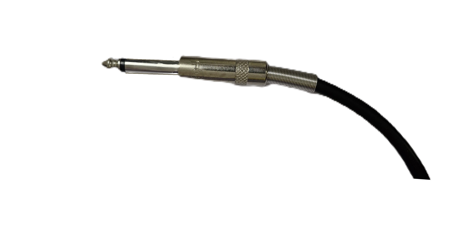
The end of the auxiliary is connected to the wireless receiver, which is placed just under the display panel.
Auxiliaryର ଶେଷ ଅଂଶ wireless ରିସିଭରକୁ ସଂଯୁକ୍ତ କରାଯାଇଛି, ଯାହାକି display panel ତଳେ ଦିଆଯାଇଛି।
1c. Indicators (ସୂଚକଗୁଡ଼ିକ)
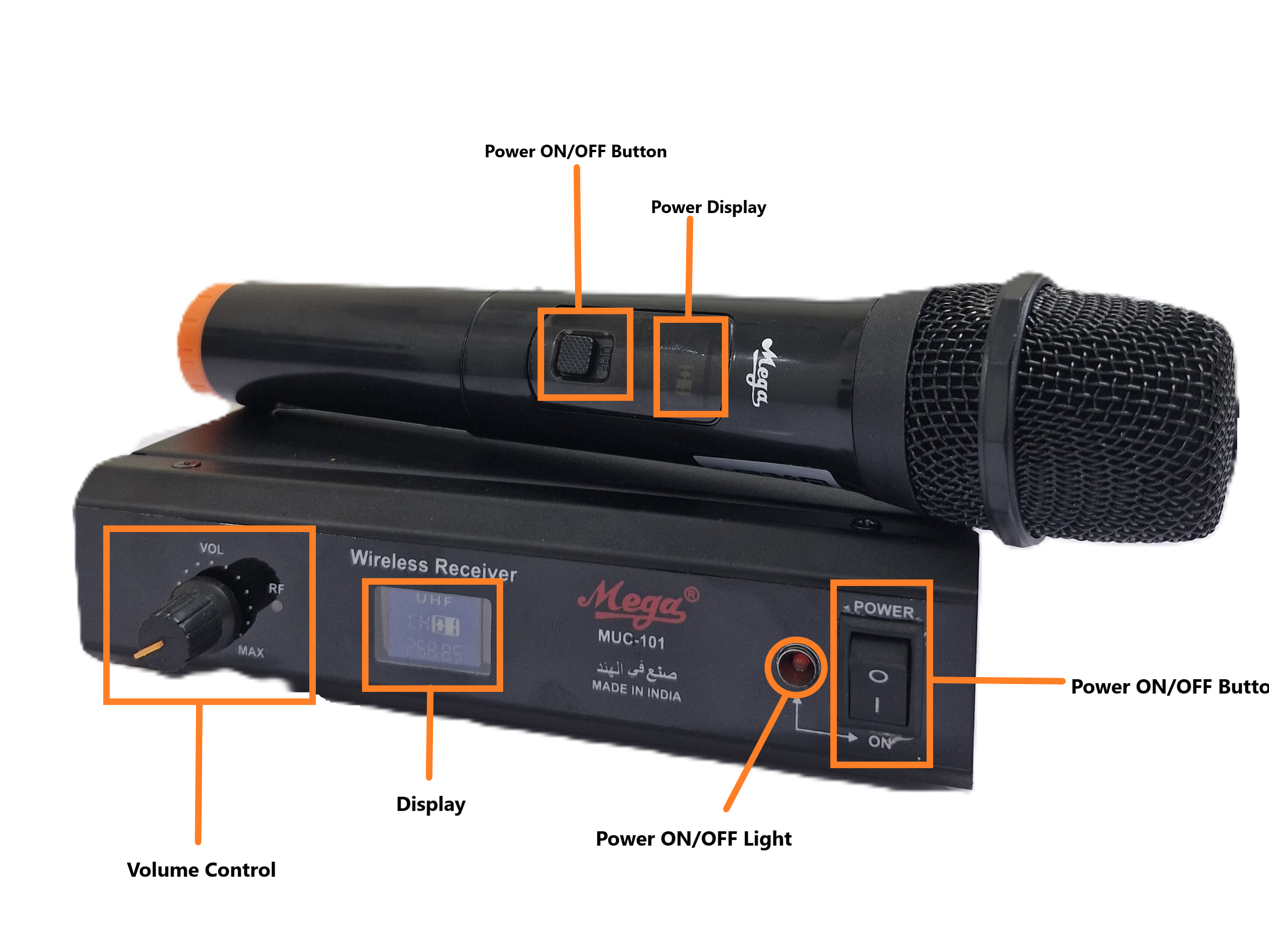
The Microphone has a Power ON/OFF Button along with a power display. The Wireless Receiver has a Power ON/OFF Button along with a Power light (Red), a display, and a Volume Control.
ମାଇକ୍ରୋଫୋନ୍ରେ ଏକ Power ON/OFF ବଟନ୍ ସହିତ ଏକ ପାୱାର୍ ଡିସ୍ପ୍ଲେ ରହିଛି। Wireless ରିସିଭରରେ ଏକ Power ON/OFF ବଟନ୍ ସହିତ ଏକ ଡିସ୍ପ୍ଲେରେ ଲାଲ ପାୱାର୍ ଲାଇଟ୍ ଏବଂ ଏକ Volume Control ରହିଛି।
2. Troubleshooting (ସମସ୍ୟା ନିବାରଣ)
Check Connections (ସଂଯୋଗଗୁଡ଼ିକର ଯାଞ୍ଚ)
- Ensure all cables are securely connected to the microphone, receiver, amplifier, and speakers.
- ସମସ୍ତ କେବଲ୍ଗୁଡ଼ିକୁ ମାଇକ୍ରୋଫୋନ୍, ରିସିଭର୍, ଆମ୍ପ୍ଲିଫାୟର୍, ଏବଂ ସ୍ପିକର୍ଗୁଡ଼ିକ ସହିତ ଠିକ ଭାବରେ ସଂଯୁକ୍ତ କରିବାକୁ ନିଶ୍ଚିତ କରନ୍ତୁ।
- Check if the power cables are properly plugged into electrical outlets and the devices are powered on.
- ପାୱାର୍ କେବଲ୍ଗୁଡ଼ିକ ସଠିକ ଭାବରେ ବିଦ୍ୟୁତ୍ ସଂଯୋଗକରାଯାଇଛି କି ନାହିଁ ଏବଂ ଡିଭାଇସ୍ଗୁଡ଼ିକ ଚାଲୁ ଅବସ୍ଥାରେ ଅଛି କି ନାହିଁ ଯାଞ୍ଚ କରନ୍ତୁ।
Power
- Ensure the microphone, amplifier are powered on.
- ନିଶ୍ଚିତ କରନ୍ତୁ ଯେ ମାଇକ୍ରୋଫୋନ୍, ଏମ୍ପ୍ଲିଫାୟର୍ power on ଅଛି |
- Check the battery level of the wireless microphone and replace or recharge if necessary.
- Wireless ମାଇକ୍ରୋଫୋନ୍ର ବ୍ୟାଟେରୀ level check କରନ୍ତୁ ଏବଂ ଯଦି ଆବଶ୍ୟକ ବଦଳାନ୍ତୁ କିମ୍ବା ଚାର୍ଜ୍ କରନ୍ତୁ।
Volume Levels
Ensure the volume levels on the microphone, receiver, and amplifier are turned up.
ମାଇକ୍ରୋଫୋନ୍, ରିସିଭର୍, ଏବଂ ଆମ୍ପ୍ଲିଫାୟର୍ର ଭଲ୍ୟୁମ୍ up ଅଛି କି ନାହିଁ ନିଶ୍ଚିତ କରନ୍ତୁ।
Cleaning
- Clean the microphone, receiver, and amplifier with a soft, dry cloth.
- ମାଇକ୍ରୋଫୋନ୍, ରିସିଭର୍, ଏବଂ ଆମ୍ପ୍ଲିଫାୟର୍କୁ ଏକ ନରମ ଏବଂ ସୁତI କପଡ଼ା ଦ୍ୱାରା ସଫା କରନ୍ତୁ।
- Avoid using harsh chemicals or abrasive materials that may damage the devices.
- କୃପୟା କଠୋର ରାସାୟନିକ ପଦାର୍ଥ କିମ୍ବା ଘଷିବା ସାମଗ୍ରୀ ବ୍ୟବହାର କରିବେ ନାହିଁ, ଯାହା ଡିଭାଇସ୍ ଗୁଡିକୁ କ୍ଷତି ପହଁଚାଇପାରେ।
3. Product Support (ଉତ୍ପାଦ ସମର୍ଥନ)
The microphone set is mapped to serial numbers and QR codes, which can also be scanned for the product serial number. These are to be provided to the support staff during the lodging of a product issue/complaint for easy identification of the product.
ମାଇକ୍ରୋଫୋନ୍ ସେଟ୍କୁ ସିରିଆଲ୍ ସଂଖ୍ୟା ଏବଂ QR କୋଡ୍ଗୁଡିକୁ ମ୍ୟାପ୍ କରାଯାଇଛି, ଯାହାକୁ Product ସିରିଆଲ୍ ସଂଖ୍ୟା ପାଇଁ ସ୍କ୍ୟାନ୍ କରାଯାଇପାରିବ। Product ସମସ୍ୟା/ଅଭିଯୋଗ କରିବା ସମୟରେ support staffଙ୍କୁ ଏହା ଦିଆଯିବ, ଯାହା ଉତ୍ପାଦର ସହଜ ପରିଚୟ ପାଇଁ ଅତ୍ୟାବଶ୍ୟକ।
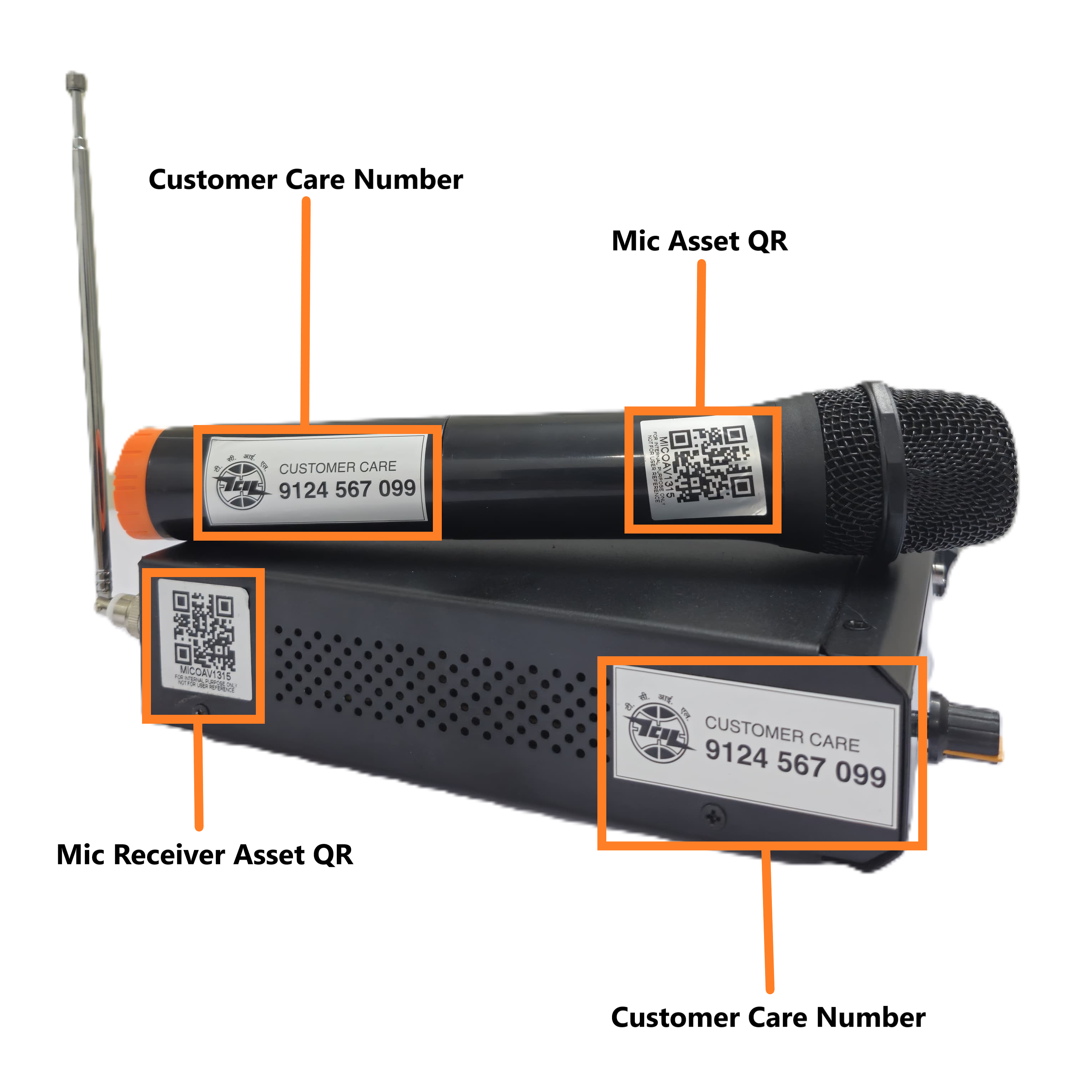
The product is provided with a customer care contact number. You can raise the product issue with the help of the serial number mentioned or by scanning the QR to fetch the serial number.
ଉତ୍ପାଦଟି ପାଇଁ ଏକ ଗ୍ରାହକ ସେବା ଯୋଗାଯୋଗ ନମ୍ବର ପ୍ରଦାନ କରାଯାଇଛି। ଆପଣ ଉଲ୍ଲେଖ କରାଯାଇଥିବା ସିରିଏଲ୍ ନମ୍ବର ସାହାଯ୍ୟରେ କିମ୍ବା ସିରିଏଲ୍ ନମ୍ବର ଆଣିବା ପାଇଁ QR ସ୍କାନିଂ କରି ଉତ୍ପାଦ ସମସ୍ୟାକୁ ଲଗ୍ କରିପାରିବେ।
For any queries or further assistance, please contact our Customer Support:
- Phone: 9124 567 099
- Email: helpdesk@ictschoollab.com